Download Documentation for Offline Use
Download your documentation as either a self-contained offline website or a single PDF for offline access.
CamelMind lets you download a self-contained offline copy of your documentation to access it anytime, even without an internet connection.
If your documentation site requires authentication, sign in first. The download buttons are only visible to authenticated users.
Download an offline package
- Open the version selector in the navigation bar.
- Select the documentation version.
- Click the download icon.
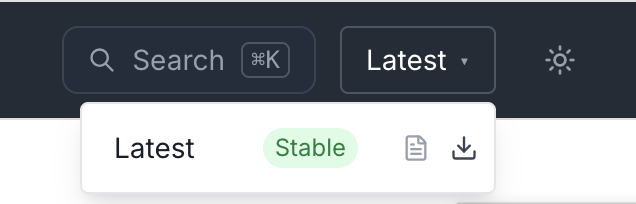
CamelMind downloads a ZIP file containing a complete offline copy of that documentation version.
Run the offline documentation
Extract the downloaded ZIP file.
Launch the local server included in the package.
| Platform | Command |
|---|---|
| macOS / Linux | ./launch.sh |
| Windows | launch.bat |
The launcher automatically opens:
http://localhost:8765/home/
The documentation behaves like the online site, including:
- Full-text search
- Navigation
- Images
- Internal links
You do not need internet connection to launch and view the site after downloading the package.
To stop the local server, press Ctrl+C in the terminal window.
Download documentation as an offline PDF
To download an offline PDF copy of the documentation:
- Open the version selector.
- Click the PDF icon beside the version.
CamelMind downloads a single PDF containing:
- Cover page
- Table of contents
- Every documentation page
Access to restricted content
If you download the ZIP or PDF from a protected documentation site, your downloaded files already contain the content the site authorized you to access. You do not need to sign in again to view the offline package or PDF.